Meigen.ai has been showing up everywhere in my WhatsApp family group lately – saree-shoot AI portraits, 3D figurine photos, all of it. A reader recently messaged me asking if meigen.ai was safe to sign into with a Google account, and I didn’t have a straight answer for her. So I dug into meigen.ai properly – going through its official site, app listings, terms of service, and technical documentation to understand exactly what it does and how it works.
This piece is based on the platform’s own site, app store listings, and published documentation rather than a hands-on trial run – I’ll update it with direct testing notes once I’ve had time to put it through its paces myself. If you want prompts I have personally tested and run, my Gemini AI photo prompts guide has 25+ from my own account.
What Is MeiGen AI, Exactly?
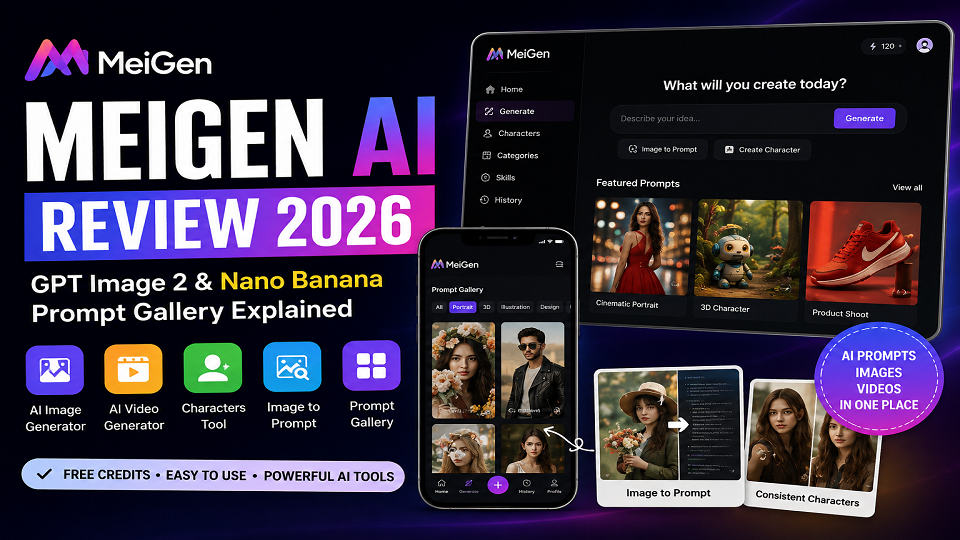
MeiGen ai is a free prompt gallery and AI image/video generator built by Meigen Creative L.L.C. The pitch, according to its own site, is simple: instead of writing the “perfect” prompt for Nano Banana or GPT Image 2 from scratch, users browse a gallery of prompts that have already worked for others, copy one, drop in their own photo, and generate.
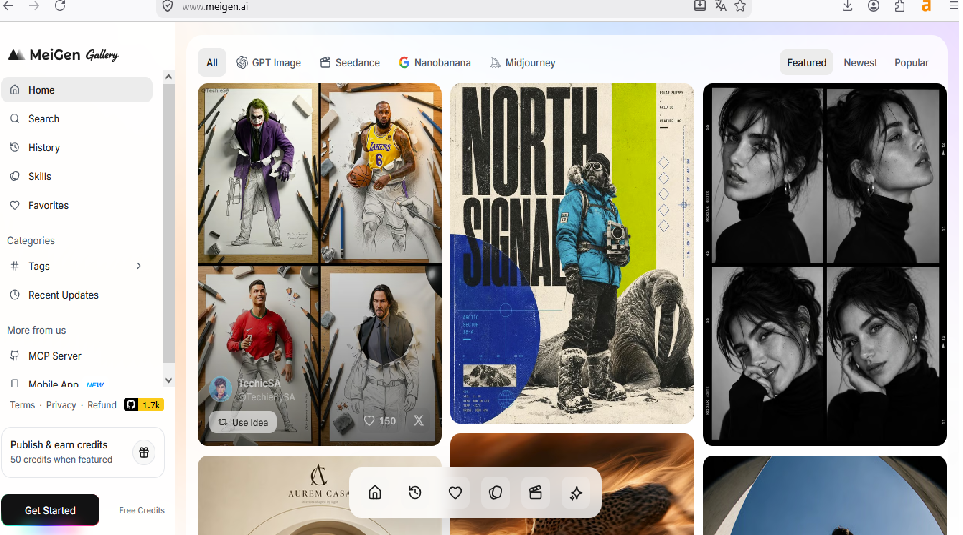
What stands out from the site’s structure is how narrowly it’s built around that one job. There’s no “all-in-one editor” bolted on for video cutting or audio work – it’s positioned as a prompt library first and a generator second, which is a different lane from jumping between ChatGPT’s photo editing prompts and a separate image tool.
According to the homepage, the main sections are:
- Generate – start from a text prompt or use “Image to Prompt”
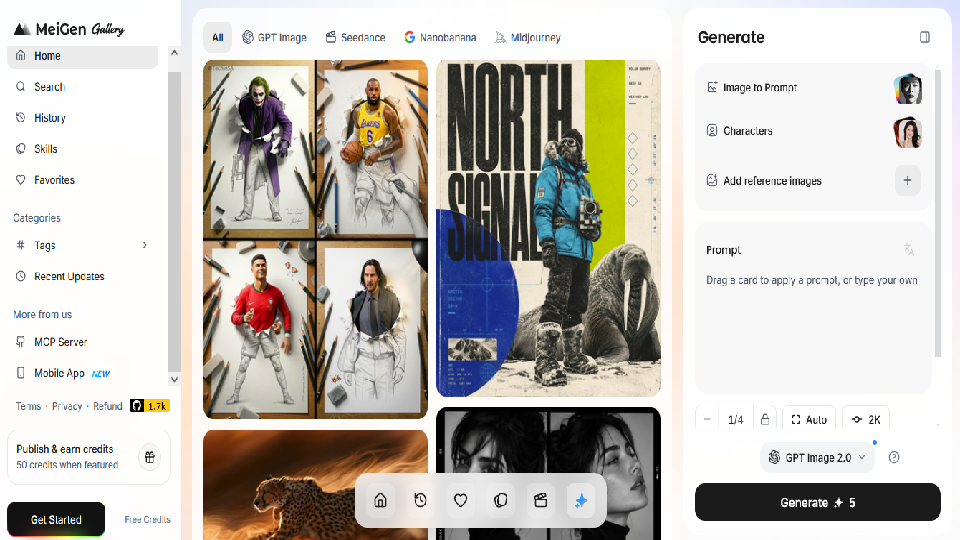
- Characters – described as a way to create a reusable AI version of a face, intended to keep results consistent across multiple generations
- Categories – Ads & Product, Brand & Logo, Videos, Illustration & 3D, Posters & Visuals, Portraits, Storyboard & Characters, and Wallpaper
- Skills and History – for saving prompt combinations and reviewing past generations
Signing Up and the Free Credits
Based on the sign-up flow, account creation runs through standard Google OAuth – no separate password to set, no lengthy email verification chain. New accounts are given a small batch of free credits automatically, described as enough for a handful of test generations before a paid top-up is needed.
One detail worth flagging for readers on Indian mobile data: MeiGen’s own app documentation states that credits, favorites, and generation history are synced between the web app and the mobile app on the same account. That means switching between a laptop and a phone mid-task shouldn’t cost you progress – useful if your workflow, like mine, jumps between devices depending on where you are.
The apps are listed officially on Google Play and the App Store.
The Feature Worth Knowing About: Image to Prompt
Most coverage of meigen ai focuses purely on the prompt gallery. What’s easy to miss is the Image to Prompt tool sitting right on the homepage.
Per its description, you upload any image – a photo whose style you like, a screenshot, anything – and MeiGen reverse-engineers a usable prompt describing the lighting, composition, and style, which you can then edit and apply to your own photo.
For anyone who has ever seen a photo style they liked but had no idea how to describe it in prompt language, this is the kind of feature that could save real trial-and-error, assuming it performs as documented.
Try It Yourself: A Simple Starter Prompt
If you want to see how MeiGen AI handles a basic generation before exploring the gallery further, here’s a straightforward portrait prompt to start with. Upload a clear, front-facing, well-lit photo of yourself, then paste this in:
“Professional studio portrait, soft diffused lighting, neutral grey backdrop, subtle smile, sharp focus on the eyes. Keep the facial features exactly as they appear in the uploaded photo – no changes to face shape, skin tone, or expression.”
Result:

This kind of prompt is a good baseline test because it’s simple enough to judge quality quickly – if the face holds up and the lighting looks natural, that’s a fair signal for how the platform handles more detailed prompts too. Once you’ve tried it, tweak one detail at a time (background color, lighting direction, outfit) rather than rewriting the whole prompt – the same rule that applies across Gemini and ChatGPT prompting holds here too.
The “Characters” Feature for Consistency
This addresses a problem I’ve flagged before when testing Gemini for photo prompts: facial consistency across multiple generations. Generate five different outfits or scenes of “yourself” through most tools, and the face tends to drift slightly with each new image.
According to MeiGen’s feature description, the Characters tool lets you build a reusable AI character from reference photos once, then apply different prompts – a studio headshot, a festival portrait, a poster style similar to what I covered in my prompt-seen-girl trend explainer – to that same saved character. On paper, this directly targets the consistency problem that comes up often with single-shot prompting in tools like Gemini.
Whether it holds up as well in practice as it’s described is something I plan to verify directly before treating it as settled – I’ll update this section once I have hands-on results.
What the Generation Quality Is Reported to Look Like
I haven’t run generations through the platform myself yet, so I can’t speak to output quality first-hand. What I can say, based on the model documentation MeiGen references (Nano Banana, GPT Image 2, and Seedance), is that these are the same underlying models powering much of the current AI photo trend – the same ones behind the results in my Gemini prompts guide and ChatGPT photo editing prompts piece.
One general rule that holds across every AI photo tool I’ve actually tested, and is worth repeating here: result quality depends heavily on your source photo. A blurry or badly lit photo caps what any of these models – MeiGen’s included – can realistically produce, regardless of how good the prompt is.
The MCP Tool: A Different Angle Worth Mentioning
Here’s something I haven’t seen covered elsewhere. MeiGen publishes an open-source MCP (Model Context Protocol) server that connects to tools like Claude Code, Cursor, and Windsurf, giving an AI coding assistant direct access to MeiGen’s prompt gallery and generation models through simple commands.
Most readers won’t use this directly – it’s aimed at developers automating design work inside coding tools – but its existence suggests there’s real infrastructure behind the free gallery rather than a thin wrapper around someone else’s API.
Pricing and Credits: What the Terms Say
MeiGen runs on a credit-based system, not a subscription, according to its published terms. Free daily credits cover standard models, and premium or higher-resolution models draw more credits per generation. There’s no visible locked-in monthly plan in the account flow – credits are topped up as needed, which in principle suits casual users better than a recurring subscription they might forget to cancel.
A few specifics confirmed against MeiGen’s own Terms of Service:
- Credits for generations rejected by content moderation are stated to be returned rather than lost
- Public gallery uploads are, by MeiGen’s own terms, visible to other users – worth avoiding for anything private or sensitive, sticking to private generations for personal photos
MeiGen AI vs. Using Gemini or ChatGPT Directly
Since most readers here are already using Gemini’s Nano Banana for prompt-based photo edits, the more useful question isn’t “MeiGen or a full editing suite” – it’s “MeiGen or just typing the prompt straight into Gemini.”
Based on how each is positioned: if you already have a tested prompt – like the ones in my Gemini AI photo prompts guide or Gemini hairstyle prompts piece – typing it directly into Gemini is the faster path. Where MeiGen’s own positioning suggests it adds value is discovery: when you don’t know what to search for yet, or want the Characters tool for consistency across a set of images, or want Image to Prompt to reverse-engineer a style you liked. On paper, it reads as a companion to Gemini and GPT Image 2 rather than a replacement for either – I’ll confirm this once I’ve run both side by side myself.
Is MeiGen AI Safe? What I Found in Its Policies
I wouldn’t describe any third-party AI image platform as completely risk-free. However, MeiGen publishes identifiable company information, Terms of Service and a Privacy Policy, which gives users more information to evaluate the service:
- The company behind it, Meigen Creative L.L.C., is named and has published Privacy Policy, Terms of Service, and Refund Policy pages
- Sign-in uses standard Google OAuth rather than asking for a separate password
- There’s an active X (Twitter) account and Discord community tied to the same brand, which at minimum confirms this isn’t an anonymous, unaccountable operation
That said, the same rule applies here as with any AI photo tool: don’t upload photos of other people without their permission, and keep anything sensitive out of public-gallery uploads. Our own Privacy Policy and Disclaimer cover how we think about this across every AI tool on the site.
MeiGen AI Pros and Cons
Pros
- Prompt discovery and inspiration in one place
- Image to Prompt feature
- Characters feature for reusable references
- Web and mobile access
- Supports multiple AI generation models
- Developer-oriented MCP integration
Cons
- Generation quality hasn’t been independently tested in this review
- Credits can limit free usage
- Public-gallery privacy needs attention
- AI-generated text/poster designs may require additional editing
- Features and pricing can change
Frequently Asked Questions
Is meigen ai the same as Gemini or Nano Banana?
No. MeiGen is a separate platform built by Meigen Creative L.L.C. that uses models including Nano Banana, GPT Image 2, and Seedance for generation, alongside its own prompt gallery, Characters tool, and Image to Prompt feature.
Does MeiGen AI have a mobile app?
Yes, official apps are listed on both Android and iOS, documented to sync credits, favorites, and generation history with the web account.
Can I use MeiGen AI outputs commercially?
According to MeiGen’s Terms of Service, compliant generated content comes with commercial usage rights, but users remain responsible for ensuring their specific use case follows the terms and applicable law.
What’s the biggest limitation of MeiGen AI?
Based on its own terms, public gallery uploads are visible to other users, making it unsuitable for private photos. Output quality across specific prompt styles hasn’t been independently verified here yet - that’s the next thing on my list to test directly.
Where This Review Goes Next
This is a documentation-based overview, not a full hands-on test – and I want to be upfront about that distinction rather than blur it. I’ll be creating a MeiGen account, running the same three-style test I use for every AI photo tool, and updating this piece with real screenshots, honest results, and anything that doesn’t match what’s described here.
In the meantime, if you want prompts I’ve already tested myself, start with my Gemini prompt list or browse more options in our AI Tools directory. If you’ve tried meigen .ai already, drop your experience in the comments – I’d genuinely like to know how the Characters tool holds up before I run my own test.
Have questions about how we test AI tools? Check our contact us directly.