
Is ChatGPT down right now? If you just opened ChatGPT and got a blank screen, a spinning cursor, or an error message — you’re not alone. ChatGPT goes down more often than most people realize, and it always seems to happen at the worst possible moment.
You typed your prompt and pressed Enter. The cursor kept blinking and blinking. No response. No errors. Just… nothing.
Or maybe you faced one of these problems:
- ChatGPT is currently at capacity
- Something went wrong. Please try again.
- 502 Bad Gateway
- A white screen that refuses to load
Does this sound familiar? You’re not wrong. ChatGPT goes down – and it goes down more often than OpenAI expects.
Here’s something no one tells you: Between January 2025 and May 2026, OpenAI recorded over 290 separate incidents. That’s roughly one incident every two days. Some incidents lasted just minutes and others lasted an entire workday.
I’ve encountered technical glitches like this countless times – in a mid of project, with a deadline nearing and no backup plan. This guide is everything I wish I had known before this happened the first time.
The Real Damage of a ChatGPT Outage
I will give you the exact figures so that you can understand it clearly.
ChatGPT currently handles over 2.5 billion prompts per day for over 500 million weekly active users. When service is disrupted – even partially – the impact is immediately visible.
On 3 February 2026, a single outage caused over 13,000 user complaints in the United States alone within a few hours. On June 10, 2025, a global outage lasted over 10 hours. Users in the US, UK, Europe and Australia were completely could not access ChatGPT. Their speeds weren’t slowed, but they were completely disconnected.
I remember that technical glitch in June. I had three articles scheduled for writing that morning. By the time ChatGPT was back up and running, I had completed them using two backup tools, which I’ll explain later in this article.
The problem isn’t just that ChatGPT is shutting down. The problem is that most people don’t have a plan for when it does. They just keep refreshing the page, wasting time and getting frustrated.
Why Does ChatGPT Keep Going Down?
I give you the exact figures so that you can understand it clearly. Before looking for a clear solution, it is important to understand what the problem really is.
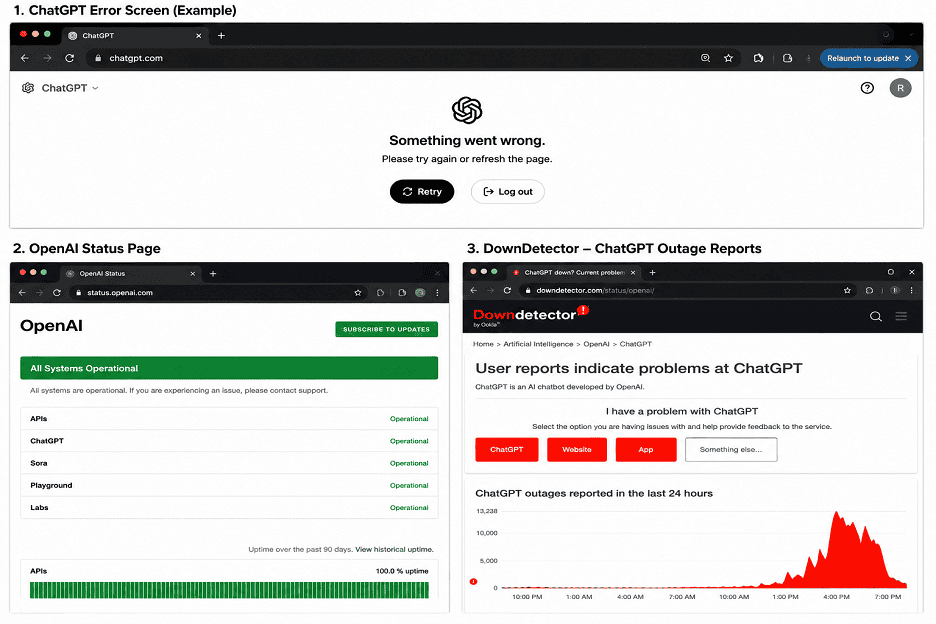
There are four main causes:
Excessive server load during peak hours
ChatGPT peak traffic occurs between 9 AM and 6 PM US time zones. When millions of users are active at the same time, even OpenAI infrastructure becomes overwhelmed. The “Capacity Limit” message is a polite way for servers to ask for a break.
System Update Fails
OpenAI continues to release updates. In June 2024, a failed deployment caused a data synchronization error, knocking the service offline for hours. Engineers attempted to push the update, but something went wrong, leaving millions of users stranded while the team worked to fix the issue.
Third-Party Infrastructure Failures
ChatGPT doesn’t just run on OpenAI’s servers. On November 18, 2025, a Cloudflare infrastructure failure caused ChatGPT, along with dozens of other major platforms, to crash simultaneously. When your cloud provider sneezes, you catch a cold.
Internal Network Outage
In December 2025, CNBC reported that an internal network outage at OpenAI caused a brief network outage. Users were unable to start new chats or view their chat history. The issue was quickly resolved, but the disruption was significant.
Understanding the cause is important because it determines how long the disruption is likely to last. Infrastructure failures are more likely to be fixed faster than update rollbacks. So if you’re wondering is ChatGPT down right now – here’s exactly how to find out in 60 seconds.
How to confirm if ChatGPT is actually down (not just you)
Before assuming the problem is on OpenAI’s end, check your setup. A slow connection or a cached error in your browser can mimic a real outage.
First, check yourself:
- Open another website to confirm your internet connection status.
- Try a hard refresh: Ctrl + Shift + R on Windows, Cmd + Shift + R on Mac.
- Try using a different browser.
- Try the ChatGPT mobile app – during partial outages, the app sometimes continues to run even when the web version is closed.
If all these attempts fail and ChatGPT still won’t load, the problem is on their end. Now, confirm it with these tools:
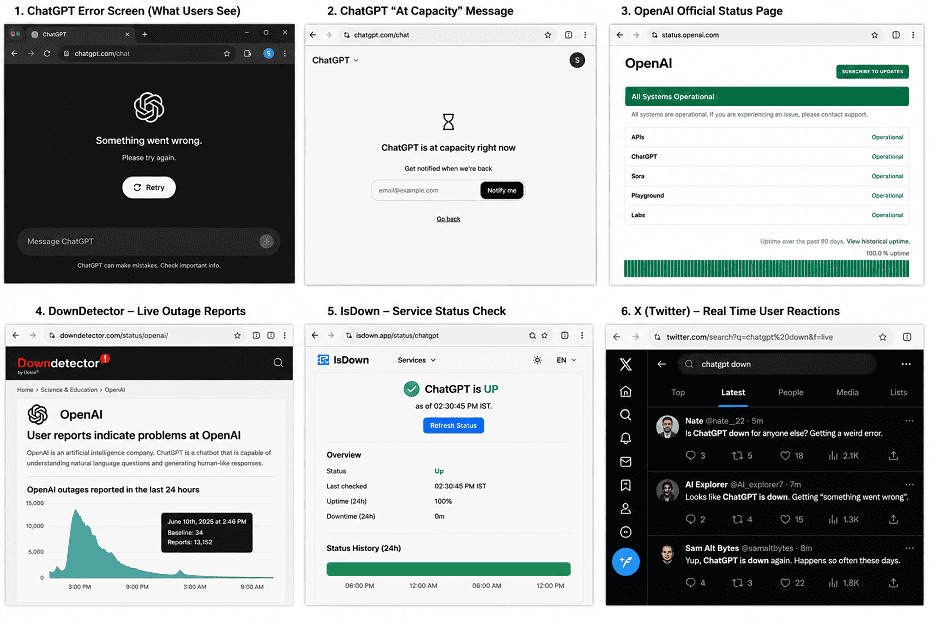
- OpenAI’s official status page: This is your first choice. OpenAI maintains a live status dashboard that tracks ChatGPT, its API and all other services in real time.
status.openai.com - DownDetector: DownDetector aggregates user reports in real time. During active outages, a sudden surge in reports can appear within minutes—often even before OpenAI officially acknowledges anything.
downdetector.com/status/openai - IsDown takes data from official status pages and user reports and displays historical event data. This is useful for understanding how long similar outages have lasted in the past. isdown.app/status/chatgpt
- Outage.Report: A lesser-known but reliable tracker that collects independent user reports. This is useful if you want to know whether an outage is widespread or regional. outage.report/app/chatgpt
- Search for “ChatGPT down” on X. This is a simple but quick method. If thousands of people are experiencing the same issue, X will be active within minutes. Search for this phrase and sort by latest—you’ll know in seconds whether you’re alone or if many others are experiencing the same issue.
twitter.com/search?q=chatgpt+down&f=live
What do those error messages actually mean?
Most guides skip this part. I think this is the most practical information I can give you.
| Error Message | Actual Meaning | Expected Wait |
| ChatGPT is currently at capacity | High usage during peak hours – too many users | 5-15 minutes |
| Something went wrong | Server-side issue, may be minor | 10-30 minutes |
| 502 Bad Gateway | Server communication interruption | Time may vary—check the status page |
| Blank Screen/Infinite Load | Generally excessive load on the server | 5-20 minutes |
| Network Error | Could be your problem or ChatGPT | Check your connection first |
| Unable to Load History | Chat history feature not working, core may still work | Try a new chat window |
The “Capacity Exceeded” message is the most common and least serious issue. In my experience, waiting 10 minutes and then trying again on mobile resolves this issue in 80% of cases.
Pay attention to the “502 Bad Gateway” message. This usually means there’s a serious infrastructure issue. If you see this, check the status page immediately.
The Best Free Alternatives When ChatGPT Isn’t Working
This is the part of the article that will really come in handy.
I’ve personally tested all of these alternatives when ChatGPT isn’t working. Not in ideal circumstances, but in real situations where I had to work and ChatGPT wasn’t cooperating.
Microsoft CoPilot – The Best All-Round Free Alternative
CoPilot runs on the same core technology as ChatGPT and is completely free, with no message limits in its standard version. It also has built-in real-time web search, which makes it superior to ChatGPT’s basic features. During the February 2026 technical outage, it was the first option I used, and it completed every task I gave it without any problems.
Perplexity AI – Best for Research
Reference sources are directly linked in each answer. If I’m doing research, writing content that requires facts, or trying to quickly understand a topic, Perplexity is far superior to ChatGPT for these specific uses. The free version is quite generous.
You.com – Best for Quick Answers
Clean interface, fast responses, built-in web search. I use it for quick questions that don’t require a long conversation. It loads quickly even when other tools are slow, which is important during high traffic times when multiple AI tools struggle to work simultaneously.
Quora’s Poe – Best for Model Diversity
Poe gives you access to multiple AI models through a single interface—including models from the GPT-4 family, Claude, and others. Free daily limits apply, but they’re sufficient for most tasks. The advantage is that if a model is slow, you can switch to another model without leaving the platform.
HuggingChat – The best open-source option
Completely free, no account required for basic use, and runs on an open-source model. ChatGPT isn’t as sophisticated, but it’s really capable for writing, summarizing, and general Q&A. It’s worth bookmarking for the option to use it without a login.
How to get instant notifications when ChatGPT is back up
Refreshing the page every two minutes is a waste of time. Instead, try one of these methods:
IsDown Free Monitoring – Create a free account at isdown.app, add ChatGPT to your monitored services, and set up email alerts when it goes down and recovers. It takes just three minutes to set up and can save a lot of hassle.
OpenAI Status Email Updates – At the bottom of status.openai.com, there’s a “Subscribe to Updates” button. Enter your email address and you’ll automatically receive notifications whenever OpenAI posts updates about active incidents.
Both are free. Both work. Set them up before the next outage.
FAQ
How long do outages typically last at ChatGPT?
Based on incidents recorded during 2025-2026, most issues are resolved within 30 minutes to 3 hours. The average resolution time for confirmed incidents recorded by IsDown is approximately 299 minutes, although minor capacity issues are resolved much more quickly.
Does ChatGPT Plus stop working during a network outage?
Yes. Plus subscribers receive priority during network slowdowns due to high traffic, but paid and free users are equally affected by overall infrastructure outages.
Why does ChatGPT show “at full capacity” even at 2 a.m.?
ChatGPT users are spread globally. When it’s 2 a.m. in the US, it’s the busiest time of day in Asia or Europe. Capacity issues can occur at any time, depending on where the sudden increase in traffic is coming from.
What’s the fastest chatgpt alternatives?
Microsoft Copilot (available at copilot.microsoft.com) - No need to create an account if you have a Microsoft account, and it runs on the same technology as ChatGPT. Try you.com for faster speeds without logging in.



1 comment