A quick note on this one: unlike our usual hands-on coverage, this particular piece is built on verified specs, official pricing, and findings from reviewers who tested the device directly – we didn’t have this specific unit in hand for this piece.
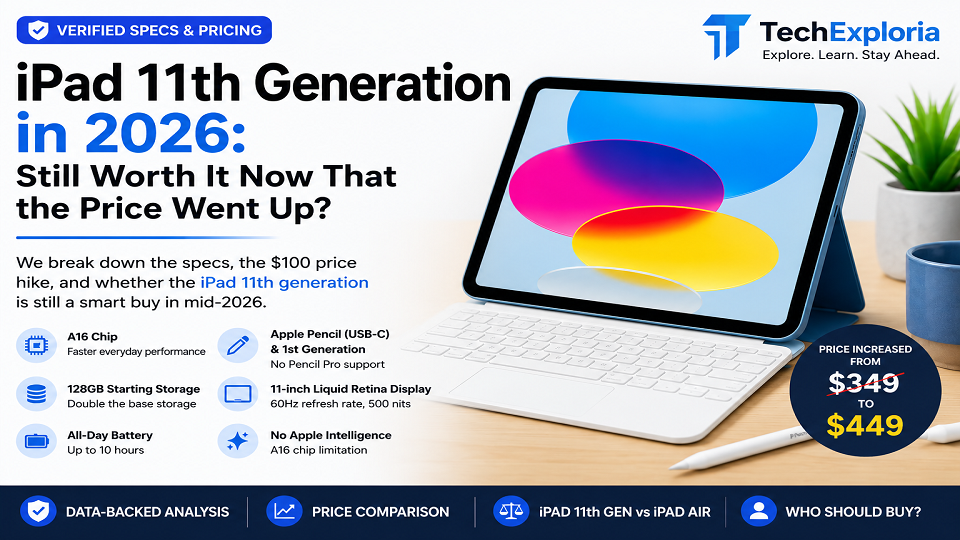
Quick answer first, since I know most people just want this part: it depends on when you’re asking. In March 2025, this iPad was $349 and an easy yes. As of June 2026, it’s $449, and that changes things enough that it’s worth actually reading the rest of this before you buy.
So what’s different about the iPad 11th generation
Apple hadn’t really touched its cheapest iPad since 2022. It got price cuts here and there, sure, but no real internal upgrade. So the March 2025 refresh, even though it looked barely different from the outside, mattered more than people gave it credit for at the time.
RAM went from 4GB to 6GB. Doesn’t sound like a headline spec, but it’s the difference between the tablet keeping up with a handful of open apps and starting to choke. Storage doubled too – 128GB is now the floor instead of a stingy 64GB, which used to be the single most common complaint about the old model. And the chip moved up to the A16, replacing the aging A14.
Everything else stayed put. Same flat-edged aluminum shell, same four colors (silver, blue, pink, yellow if you’re picking), same 10.9-inch screen running at 2360×1640 and, still, only 60Hz. Apple clearly decided this was a “fix what’s inside” update, not a “change how it looks” one.
One thing that trips people up: it works with the USB-C Apple Pencil and, with an adapter, the original 1st-gen Pencil – but not the Pencil Pro or the 2nd-gen Pencil. If you were hoping to do any real sketching or note-taking with pressure sensitivity, that’s a wall you’ll hit immediately.
iPad 11th generation price – honestly the whole story right now
Here’s where a lot of the articles still floating around the internet get it wrong – they were written back when this thing cost $349, and nobody’s gone back to update them.
As of mid-2026, the base 128GB Wi-Fi model runs $449. That’s up from $349 at launch. The Wi-Fi + Cellular version follows the same pattern, starting higher than its original $499. Apple pointed to rising RAM costs as the reason, and as far as anyone can tell, there’s no sign of it coming back down – nor is there a confirmed date yet for whatever comes next.
Why does a hundred bucks matter this much on a tablet? Because that hundred bucks used to be the entire pitch. At $349, this iPad was cheap enough compared to the Air that most people didn’t need to think twice. At $449, the gap has narrowed, and suddenly there’s an actual decision to make – especially if there’s any chance you’ll want that Pencil Pro support down the road.
For reference, here’s the full iPad 11th generation spec sheet in one place – cross-checked against Apple’s official product page:
| Spec | Detail |
| Chip | Apple A16 (5-core CPU) |
| RAM | 6GB |
| Storage | 128GB / 256GB / 512GB |
| Display | 10.9″ Liquid Retina, 2360×1640px, 60Hz, 500 nits |
| Refresh rate | 60Hz |
| Cameras | 12MP rear, 12MP front |
| Battery | Up to 10 hours of web surfing or video playback over Wi-Fi |
| Weight | 481g (Wi-Fi model) |
| Port | USB-C |
| Pencil support | USB-C + 1st generation |
| Apple Intelligence | Not supported |
| Colors | Silver, Blue, Pink and Yellow |
What actually works in its favor
Most of the credit goes to that RAM bump. 6GB isn’t much next to a laptop, but for browsing, streaming, note-taking, and the usual multitasking people actually do on a basic iPad, it’s enough headroom that things don’t feel like they’re straining anymore – which the old 4GB model sometimes did.
The storage fix matters more than people expect too. Going from 64GB to 128GB as the starting point removes what used to be the number one complaint from anyone who bought the entry-level model and immediately ran out of space.
And even at the new price, the Apple iPad 11th generation is still the cheapest current-gen model in the lineup. It runs the same iPadOS everything else does, minus Apple Intelligence – more on why that’s missing in a second.
Where it comes up short
The Pencil situation is the big one, and honestly the one most likely to actually matter to you depending on what you’re planning to use it for. USB-C Pencil only. No Pro, no 2nd-gen. No pressure sensitivity, no Hover, no Squeeze gesture. If any of that was on your checklist, this isn’t the tablet.
The screen staying at 60Hz is fine right up until you’ve actually used something with ProMotion. People who’ve tried both tend to notice it in scrolling especially. If you’ve never touched a 120Hz display though, you genuinely won’t miss what you’ve never had.
Then there’s the price, again, because it’s unavoidable. The entire selling point of this iPad used to be “barely any compromises for way less money.” At $449 that pitch still mostly holds, just weaker than it did a year ago.
And no Apple Intelligence – the A16 chip in this configuration isn’t the one Apple uses elsewhere to support it. If Apple’s AI features are a priority for you, it’s worth reading our Google AI Mode guide to see how the on-device AI landscape compares across platforms right now.
iPad 11th generation vs. iPad Air – quick comparison
If you’re torn between the two: The Air runs an M-series chip instead of the A16, some configurations hit 120Hz instead of being capped at 60, it supports the Apple Pencil Pro, and it gets Apple Intelligence. The starting price gap between them has shrunk since the iPad 11th generation price went up in June, so the decision is closer than it used to be.
Pick the iPad 11th generation if you mainly want something for browsing, streaming, and everyday light use, and you genuinely don’t care about Pencil Pro features or Apple Intelligence. Pick the Air if you do any creative work, want the smoother screen, or want those AI features – and you’re okay paying the difference, even if it’s smaller than it was in 2025.
Who this is actually for
Students and casual users who mostly browse, stream video, and jot down notes will be fine with this – if you’re a student figuring out how to get the most out of it for schoolwork, our Best ChatGPT Prompts guide is worth pairing with a device like this. So will anyone upgrading from something older than the 9th generation, where the speed and storage jump will be obvious immediately. If you specifically don’t need Pencil Pro or Apple Intelligence, there’s no real reason to spend more.
On the flip side – skip it if you’re a digital artist or want pressure-sensitive drawing, if you already own a 10th-gen iPad (the practical upgrade isn’t big enough to justify replacing it), or if you’re shopping purely on price without checking current Air pricing first. That gap has closed more than people realize.
Faq’s
Is it worth buying in 2026?
For most casual use – browsing, Netflix, taking notes, the occasional video call – yeah, it holds up. It starts to wobble the moment you picture yourself sketching on it, since Pencil Pro just isn’t in the cards here.
What’s the iPad 11th generation price right now?
$449 for the base 128GB Wi-Fi model. Launched at $349 in March 2025, Apple raised the price by about $100 in June 2026, citing sharply higher memory costs.
Does it work with the Apple Pencil Pro?
No – USB-C Apple Pencil only, no Pro, no 2nd-gen. If Hover or pressure sensitivity matter to you, that’s an Air or Pro conversation instead.
How much better is it than the 10th-gen version, actually?
More than the spec sheet suggests on paper. Double the RAM, double the base storage, a newer chip – the kind of stuff you notice using it day to day, not just reading about.
Should I wait for whatever comes next instead?
Depends how patient you are, honestly. There’s no confirmed date for a 12th-gen model yet. If you need something now, this is still a reasonable buy. If you can hold off, it might be worth watching before paying $449 for the current one.
Final Words
Nothing about the hardware got worse – the iPad 11th generation is the exact same tablet it was at $349. What changed is the math. At the old price this was close to a no-brainer. At $449 it’s still a solid pick if you just want a reliable everyday iPad, but it’s not the obvious “why would you buy anything else” answer it used to be. If Pencil work or Apple Intelligence matter to you at all, spend the extra and get the Air. If they don’t, this still gets the job done.
Want to contribute reviews or buying guides like this to Tech Exploria?