
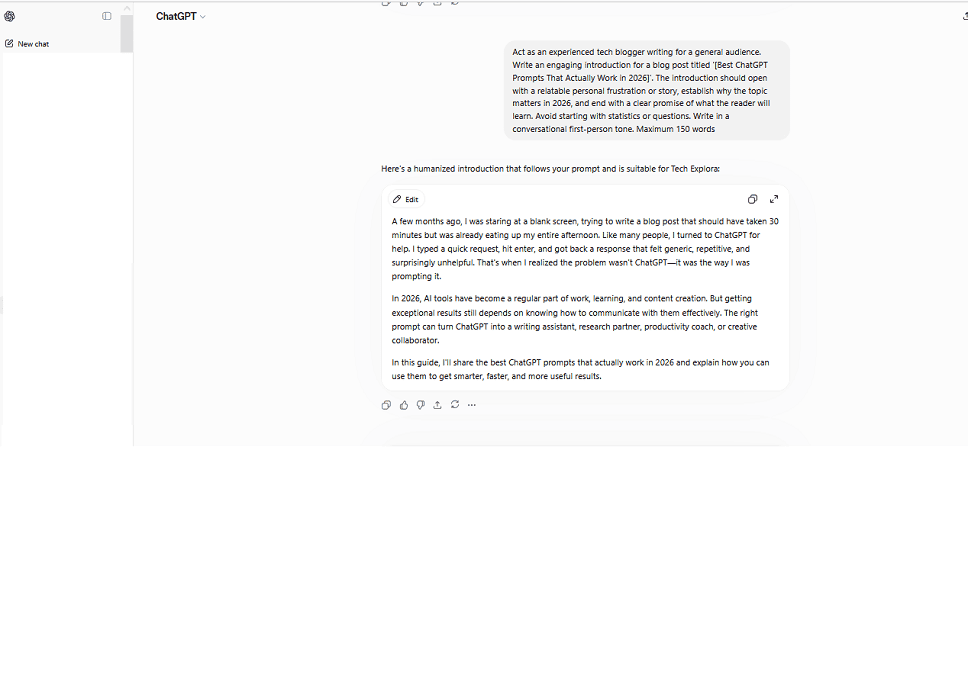
If you are looking for the best ChatGPT prompts that actually work – not the generic ones you find everywhere – you are in the right place. There is a specific Tuesday I remember clearly. I had a deadline, zero inspiration, and a vague hope that ChatGPT would somehow save me. I typed something like “help me write a blog intro about technology trends.” Hit enter. Waited.
The output was four paragraphs of the most forgettable writing I had ever read. I could have written that in my sleep. Actually, I could have written something better in my sleep.
I almost gave up on the whole thing. Then a friend showed me how she was actually using ChatGPT – with these long, detailed, structured prompts that looked almost like instructions for a new employee. I thought she was over complicating it.
She was not.
The difference in output was immediate and honestly a little humbling. Same tool. Completely different results. The only variable was the quality of the prompt.
Here are the 15 prompts I use regularly now – for writing, learning, productivity, career work, and image creation. Each one follows a framework I will explain at the end so you can build your own.
Quick Answer: Role + Task + Context + Format + Tone. That is the formula. Everything else is detail.
Why Most People Fail When Using ChatGPT
Here is something nobody told me when I started – ChatGPT is not Google. I know that sounds obvious. But I was using it exactly like a search engine for weeks and wondering why the results were so disappointing.
At least, I discovered that the hard way after asking ChatGPT to help me with my resume, getting an absolutely generic template which looked just the same as any other online.
As soon as I started using a well-built prompt with the context, role, and precise instructions, the results became totally different.
This is the formula I apply to every prompt:
- Roles – Inform ChatGPT on its persona (“Act as a senior copywriter”)
- Tasks – Direct ChatGPT on its mission (“Write a product description”)
- Context – Provide ChatGPT with necessary information (“For a budget Android phone for Indian college students”)
- Format – Explain to ChatGPT how it should deliver the task results (“In a list form, under 100 words”)
- Tone – Define the writing style (“Friendly and conversational, no business”)
With the above formula in mind, here are the top ChatGPT prompts in all categories.
ChatGPT Prompts for Writing and Content Creation
These are the prompts I keep coming back to for TechExploria — blog posts, emails, social content. They work every single time.
How to Write Better ChatGPT Prompts for Blog Content
The first mistake that many bloggers make when using ChatGPT is asking the AI to “Write a blog post.” This is akin to telling a cook to “Cook.”
Prompt 1 – The Anti-Generic Blog Introduction
“Act as an experienced tech blogger writing for a general audience. Write an engaging introduction for a blog post titled ‘[your title]’. The introduction should open with a relatable personal frustration or story, establish why the topic matters in 2026, and end with a clear promise of what the reader will learn. Avoid starting with statistics or questions. Write in a conversational first-person tone. Maximum 150 words.”
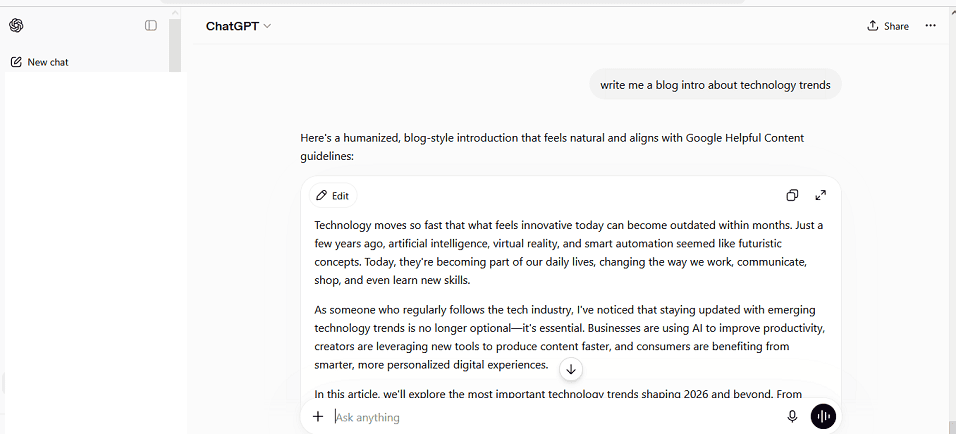
I use this exact prompt structure for every TechExploria article. It consistently gives me introductions that feel human rather than robotic.
Prompt 2 – The Content Rewriter
“Act as an editor who specializes in making AI-generated content sound human. Rewrite the following paragraph to sound like it was written by a real person sharing genuine experience. Remove formal transitions like ‘furthermore’ and ‘additionally’. Add one specific personal detail or observation. Keep the meaning identical but make the tone feel warm and direct: [paste your paragraph]”
This one saved me hours of manual editing when I first started using AI for content.
Prompt 3 – The Email Subject Line Generator
“I am sending a newsletter to my tech blog subscribers about [topic]. Generate 10 email subject lines. Mix styles – some should use curiosity gaps, some should use numbers, some should make a bold claim. Avoid clickbait. Each subject line should be under 50 characters. Target audience: everyday tech users aged 25-45.”
Best ChatGPT Prompts for Learning and Research
I genuinely wish I had found these earlier. I paid for online courses on topics I could have just asked ChatGPT to teach me – properly.
Using ChatGPT as a Personal Tutor
Prompt 4 – The Explain Like I’m New To This
“I am completely new to [topic]. Explain it to me in simple language using one real-world analogy I would encounter in daily life. Then give me three practical examples of how this concept applies to everyday situations. Finally, tell me the one most important thing a beginner should understand about this topic. Do not use jargon.”
I used this exact prompt to understand machine learning concepts before writing about them. The analogies ChatGPT generates make complex topics instantly digestible.
Prompt 5 – The Socratic Learning Prompt
“I want to deeply understand [topic]. Instead of just explaining it to me, ask me 5 questions one at a time. After each answer I give you, correct any misconceptions, add what I missed, and then ask the next question. Start with the first question now.”
This is genuinely one of the best learning prompts I have come across. It forces active recall instead of passive reading, which actually helps information stick.
Prompt 6 – The Research Summarizer
“I am researching [topic] for a blog post targeting general readers. Summarize the 5 most important things someone needs to understand about this topic in 2026. For each point, explain why it matters to an everyday person. Use plain language. Flag anything that is rapidly changing or still debated among experts.”
Pair this with tools like Perplexity AI for cited sources, and Consensus for research-backed answers – these complement ChatGPT beautifully for deeper research.
Best ChatGPT Prompts for Productivity and Daily Work
These are the ones I reach for almost every day. Some of them have saved me hours in a single week.
Getting Real Work Done with ChatGPT
Prompt 7 – The Meeting Notes Transformer
“I have rough notes from a meeting. Transform them into a structured summary with three sections: Key Decisions Made, Action Items with Owner Names, and Open Questions. Keep each action item to one sentence. Here are my notes: [paste notes]”
Prompt 8 – The Decision Framework Builder
“I am trying to decide between [option A] and [option B]. Help me think through this decision by building a simple comparison framework. Consider these factors: [list your factors]. Present the comparison as a clear table. Then give me your honest assessment of which option is better and why, assuming my goal is [your goal].”
I used this prompt when deciding which SEO tools to use for TechExploria. ChatGPT laid out the comparison clearly and actually saved me from overspending on a tool I did not need.
Prompt 9 – The Time Block Planner
“I have these tasks to complete today: [list your tasks]. I work best in 90-minute focused blocks with 20-minute breaks. I have from [start time] to [end time]. Create a realistic daily schedule that groups similar tasks together, accounts for energy levels throughout the day (high focus tasks in the morning), and includes buffer time for unexpected interruptions. Format it as a simple table.”
Best ChatGPT Prompts for Career and Professional Development
A friend of mine used one of these prompts before an interview last year. She said it was the most prepared she had ever felt walking into a room. She got the job.
ChatGPT Prompts for Job Seekers
Prompt 10 – The Tailored Cover Letter Builder
“Act as a professional career coach with 15 years of experience in hiring. Write a cover letter for a [job title] position at [company name]. The applicant has [X years] of experience in [field]. Their biggest achievement is [specific achievement with numbers if possible]. The company values [mention 2-3 things from the job description]. The letter should be confident but not arrogant, specific but not boring, and under 300 words. Avoid generic openers like ‘I am writing to apply for’.”
Prompt 11 – The Interview Preparation Coach
“Act as a tough but fair hiring manager for a [job title] role at a [type of company] company. Ask me 5 behavioural interview questions one at a time based on this job description: [paste job description]. After each answer I give, tell me what was strong about my response, what was weak, and how I could improve it. Start with the first question.”
Prompt 12 – The LinkedIn Profile Optimizer
“Act as a LinkedIn profile expert. Rewrite my LinkedIn summary to make it stand out from generic profiles. It should lead with a specific result I have achieved rather than my job title. Use first person. Sound like a real person, not a corporate announcement. Here is my current summary: [paste summary]. My target audience is [who you want to attract]. Keep it under 220 words.”
Best ChatGPT Image Prompts for Visual Content Creation
This part most guides completely ignore – and it frustrated me for a long time. I kept describing images and getting something totally different. This formula fixed it.
How to Write Better ChatGPT Image Prompts
The formula for strong image prompts is: Subject + Setting + Style + Lighting + Mood + Technical Details.
Prompt 13 – The Professional Blog Featured Image
“Create a flat design illustration for a tech blog article about [topic]. The image should feel modern and clean with a [color 1] and [color 2] color palette. Include [2-3 specific visual elements related to the topic]. Style: similar to icons used in Google’s Material Design. No text in the image. Horizontal format, 16:9 ratio.”
Prompt 14 – The Social Media Graphic
“Create a bold, eye-catching social media graphic for Instagram. The subject is [your topic]. Use a dark background with [accent color] highlights. The overall mood should feel energetic and modern. Include abstract geometric shapes as background elements. The style should feel like a tech startup brand. No text. Square format.”
Prompt 15 – The Realistic Product Concept
“Create a hyper-realistic product concept image showing [product description]. The setting is a clean white studio with soft directional lighting from the upper left. The product should look like a professional commercial photograph. Show the product at a slight 3/4 angle. The overall tone should feel premium and aspirational.”
For image generation beyond ChatGPT, I personally use Adobe Firefly for commercial-safe images and Ideogram when I need text inside images – both are free to start and produce consistently strong results.
How to Write Better ChatGPT Prompts – The Complete Framework
You have seen the prompts. Now here is why they actually work – because understanding the logic means you can build your own instead of just copying mine.
The Five-Step Checklist of Good Prompts I Apply Every Single Time
Quick check I run before hitting send – five questions, takes about 10 seconds:
- Am I defining the role?
When telling ChatGPT to “act as” somebody, the generated content changes completely. Compare asking ChatGPT to write something versus asking it to “act as a senior tech journalist.”
- Am I providing a specific context?
A general context yields generic responses. “Generate content for my blog” won’t get you anywhere. “Generate content for my blog about technology in India for users age 20-35 who have no experience using Android” will.
- Have I described the exact format?
Bullet points? A table? A paragraph? List? Be sure to tell ChatGPT exactly what you want because otherwise, it will give you whatever format it feels like giving you.
- Did I tell it what not to do?
Negative commands are just as effective as positive commands. For example: “Do not use corporate language. Do not begin your response with a statistic. Do not say ‘In conclusion’.” They are used to keep ChatGPT from committing the most typical mistakes in its writing.
- Is there any limit on length or scope?
For example: “No more than 150 words” or “Five bullet points exactly.” Otherwise, it tends to become overly wordy.
FAQ
How should you craft prompts for images in ChatGPT?
Use this formula: Subject + Setting + Art Style + Lighting + Mood + Technical Format. And always add what you do NOT want - that single addition makes a bigger difference than most people expect.
Why does ChatGPT provide inconsistent results based on a prompt?
It is supposed to - randomness is built in by design. Just add “give me a consistent structured response each time” to your prompt. Works surprisingly well.
Are there any free options for ChatGPT prompts?
Absolutely, Perplexity AI is great for sourcing research papers, Claude gives better output for longer writings, while Ideogram works great with image prompts along with text prompts. All of these are used by me along with ChatGPT depending upon the type of work.
What should be the length of a good ChatGPT prompt?
No perfect number - but 50 to 150 words is the sweet spot in my experience. Under 10 words and you are almost certainly being too vague. Over 200 and you risk confusing it.
Final Words
Look – I went from getting outputs I immediately deleted to actually saving ChatGPT responses in my notes. The only thing that changed was how I asked.
Pick one prompt from this list right now. Change the details to fit your situation. Run it. You will immediately see the difference that structure makes.
For more honest AI tools guides, visit TechExploria.com – and drop your questions in the comments. I read every single one.



1 comment