Quick summary
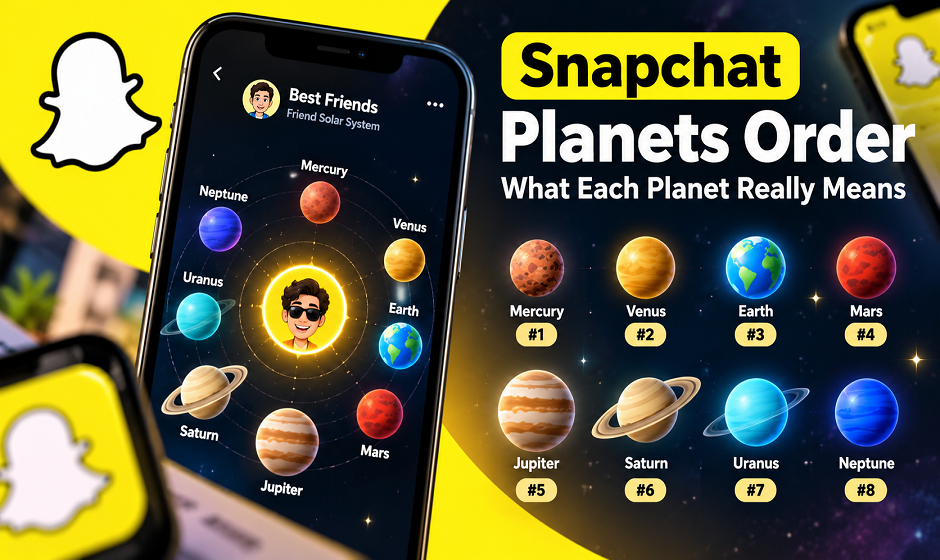
- Snapchat Planets (officially called Friend Solar Systems) show where you rank among someone’s top eight friends. Mercury is first and Neptune is eighth.
- You need a Snapchat Plus subscription to see them.
- The feature is switched off by default for new subscribers, so you have to turn it on yourself.
- The ranking follows how much you and that friend Snap and chat. It does not measure popularity or how much someone likes you.
If you’ve ever stared at a tiny planet next to a friend’s name and wondered whether Neptune is an insult, you’re not alone. What surprises most people isn’t the planets. It’s how little the app explains about them.
In this guide I’ll cover what Snapchat Planets are, the exact Snapchat planets order, how to find yours, and what the feature can’t tell you. I wrote it for U.S. Snapchat users, but it applies anywhere Snapchat Plus is available.
What Are Snapchat Planets?
Snapchat Planets are a Snapchat Plus feature that places your closest friends in a mini solar system, with you as the sun. Each of the eight planets, from Mercury to Neptune, marks a position in that person’s best friends list.
Snapchat’s own name for it is the Friend Solar System. Many people also search for it as Snap Planets or friendship planets, and it’s all the same feature.
One detail matters here. You never see your own solar system with your friends orbiting you. You see where you sit in their system. Your best friend’s view of you and your view of them can be completely different.
Snapchat Plus Planets: What You Need Before You Start
This is where most people get stuck, and I think it’s the most useful part of this guide.
Snapchat Plus planets only work if you meet two conditions:
- You have an active Snapchat Plus subscription. The free app doesn’t show the planets. Pricing differs by country and app store, so check the current price in your own app rather than trusting an old blog post, including this one. Snapchat explains the plan on its official Snapchat+ page.
- Solar System is turned on. According to Snapchat’s support page, the feature is off by default for first-time subscribers. You have to open the Snapchat+ feature management page and switch it on. You can turn it off again whenever you like.
If you subscribed and see nothing, check that toggle before assuming something is broken
Snapchat Planets in Order: Mercury to Neptune
Here is the Snapchat planets order from the most-contacted friend to the eighth. The “what it signals” column is my plain-English reading, not an official definition.
| Rank | Planet | What it signals |
| 1 | Mercury | You’re their most active chat partner right now |
| 2 | Venus | Very close second, with constant back-and-forth |
| 3 | Earth | Strong, regular contact |
| 4 | Mars | Frequent contact, just below the top three |
| 5 | Jupiter | Solid mid-list friend |
| 6 | Saturn | You talk often, but others talk more |
| 7 | Uranus | You barely made the list |
| 8 | Neptune | Last seat, but still top eight |
Notice that I haven’t described planet colors or Bitmoji expressions. The articles I compared don’t agree on them. One describes Mercury as light red, another as dark orange-brown, and Snapchat tweaks the artwork over time. To check which planet you’re looking at, use Snapchat’s official Friend Solar System guide, which shows every planet’s current look.
Quick shortcut for Snapchat planets order
If you only remember one thing, remember this: the planet number is your rank, and Mercury is the best place to be. In the same way, Earth is third and Neptune is eighth.
How to Check Your Snapchat Best Friends Planets
Menu names shift between app versions, so the steps below are the general path I’d follow:
- Update Snapchat and confirm your Snapchat Plus subscription is active.
- Make sure Solar System is switched on in the Snapchat+ settings.
- Open a chat with the friend and go to their Friendship Profile (tapping their Bitmoji in the Chat list is the usual route).
- Look for the gold-ringed “Best Friends” badge.
- Tap the badge. You’ll see their Bitmoji as the sun and your Bitmoji on one of the planets.
If there’s no gold ring, it generally means you’re not in their top eight. That doesn’t mean you’re not friends.
What Snapchat Planets Don’t Tell You
I think this is where the feature gets over-interpreted. Here’s what a Snapchat Best Friends planet doesn’t mean:
- It isn’t a popularity score. It counts how often the two of you Snap and chat. It says nothing about how much someone values you.
- It isn’t mutual. You can be Venus on their list while they’re Saturn on yours.
- It isn’t fixed. The ranking follows recent activity, so it can shift after a busy week or a quiet one.
- It’s not fully transparent. Snapchat says the ranking is based on who you Snap and chat with most, but it doesn’t publish the exact formula.
- It can’t show other people’s planets. You only learn your own position in their system.
Plenty of users feel hurt by a Neptune placement. Here’s the thing to keep in mind: a friend who texts you on WhatsApp all day and rarely uses Snapchat will show up low here. The planet shows where the conversation happens, not how close you are.
Can You Move Up the Snapchat Planets?
Honestly, yes, but only in the boring way: talk to that person more on Snapchat. There’s no trick, no setting, and no shortcut.
I’d also be careful with anything that promises otherwise. Many sites online claim to ‘check your Snap planets’ or ‘boost your planet rank. Treat those as red flags:
- Never type your Snapchat password into a third-party site.
- Ignore anything that asks you to “verify” your account to see planets.
- Remember that the only place the real data lives are the Snapchat app.
That caution applies to any account-linked tool, not just this one.
Is Snapchat Plus Worth It Just for Planets?
On its own, probably not. The planets are fun, but they’re a small piece of the subscription. If you’re curious, I’d suggest a short trial period if one is offered in your region, look at the other Plus features you’d actually use, and then decide. Cancel from your app store account if it doesn’t earn its keep.
Frequently Asked Questions About Snapchat Planets
Do I need Snapchat Plus to see Snapchat Planets? Yes. The Friend Solar System is a Snapchat Plus feature, and it must also be turned on in the Snapchat+ settings.
What is the Snapchat planets order? Mercury is first, then Venus, Earth, Mars, Jupiter, Saturn, Uranus and Neptune. Each planet marks a spot in someone’s top eight best friends.
Which Snapchat planet is the best? Mercury, because it means you rank first on that person’s list.
Can I see everyone’s planets? No. You only see where you rank in a friend’s solar system, not who sits on their other planets.
Why can’t I see Snap Planets after subscribing? Check three things: the Solar System toggle in the Snapchat+ settings, an up-to-date app, and whether you actually fall within that friend’s top eight.
Final Thoughts
Snapchat Planets are a playful way to see who you talk to most, and nothing more. Mercury through Neptune is a snapshot of recent activity, not a verdict on a friendship. Enjoy it, don’t over-read it, and keep your login details to yourself.
Your turn: which planet are you on your closest friend’s list? Tell me in the comments, and check out our other guides on Snapchat features at Techexploria.